
In today’s world, data is all around us—from the fitness tracker on your wrist to the sensors keeping tabs in a factory. But how do we actually store, manage, and make sense of all this information? That’s where databases come into play.
A database is essentially a tool that helps us store and organize information, making it super easy to search, analyze, and utilize. There are various types of databases, but one particularly interesting type is the time-series database.
Why Databases Matter
In today’s world, data is all around us—from the fitness tracker on your wrist to the sensors keeping tabs in a factory. But how do we actually store, manage, and make sense of all this information? That’s where databases come into play. A database is essentially a tool that helps us store and organize information, making it super easy to search, analyze, and utilize. There are various types of databases, but one particularly interesting type is the time-series database.
What is Time-Series Data?
Time-series data refers to any data that’s collected over a period of time. Here are a few examples:
- Heart rate readings every second.
- Temperature readings every minute.
- Stock prices every hour.
- Website traffic every day.
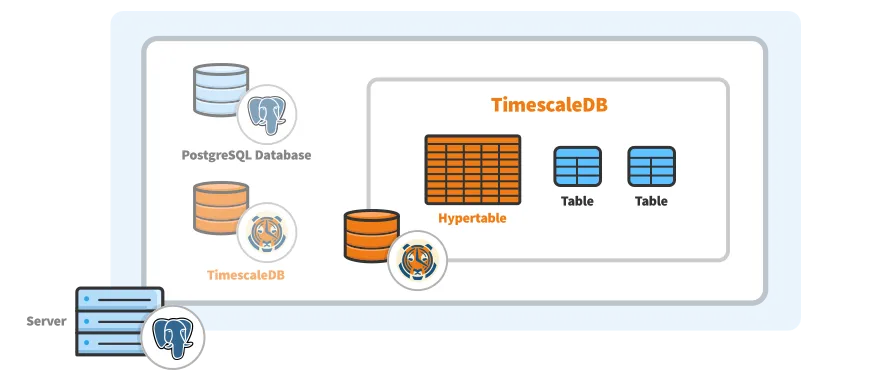
What is TimescaleDB?
Built on top of the widely used PostgreSQL database, TimescaleDB is an open-source time-series database.
This implies:
- You have access to PostgreSQL's full power.
- PLUS unique features for more effective handling of time-series data.
Why utilize TimescaleDB?
- It manages enormous volumes of time-stamped data.
- For time-based queries (such as hourly averages), it is quicker.
- It compresses old data to save storage.
- It facilitates real-time analytics and dashboards.
TimescaleDB Use (Basic Setup)
Assume you are using sensors to measure temperatures.
Step 1: Create a Table
CREATE TABLE temperature_data (
time TIMESTAMPTZ NOT NULL,
sensor_id TEXT,
value DOUBLE PRECISION
);
Step 2: Convert to a Hypertable (special table for time series).
SELECT create_hypertable('temperature_data', 'time');
We've now fine-tuned the table for better time-series storage and performance!
Simple query example:
Get the average temperature per hour:
SELECT time_bucket('1 hour', time) AS hour,
AVG(temperature) AS avg_temp
FROM temperature_data
GROUP BY hour;
The time_bucket() function is perfect for grouping your data by time, making it super handy for summaries.
Intro to Advanced PL/SQL Features in TimescaleDB
Once you’ve got the basics down, TimescaleDB opens up a world of advanced tools that let you do even more—automatically, efficiently, and intelligently. Let’s explore three standout features:
1. Continuous Aggregates (Auto summaries)
Rather than recalculating averages or sums every time you run a query, you can create pre-computed summaries that update on their own.
CREATE MATERIALIZED VIEW hourly_avg_temp
WITH (timescaledb.continuous) AS
SELECT time_bucket('1 hour', time) AS hour,
sensor_id,
AVG(temperature) AS avg_temp
FROM temperature_data
GROUP BY hour, sensor_id;
2. Compression (Save space)
Older data can be automatically compressed, which not only saves space but also speeds up queries for historical data.
ALTER TABLE temperature_data SET (
timescaledb.compress,
timescaledb.compress_orderby = 'time DESC',
timescaledb.compress_segmentby = 'sensor_id'
);-- Compress data older than 30 days
SELECT add_compression_policy('temperature_data', INTERVAL '30 days');
3. Triggers (Automate actions)
With PL/pgSQL triggers, you can set up rules that automatically respond when new data is inserted.
Example: Automatically add a default value if the sensor_id is missing.
CREATE OR REPLACE FUNCTION set_default_sensor()
RETURNS TRIGGER AS $$
BEGIN
IF NEW.sensor_id IS NULL THEN
NEW.sensor_id := 'unknown_sensor';
END IF;
RETURN NEW;
END;
$$ LANGUAGE plpgsql;CREATE TRIGGER sensor_trigger
BEFORE INSERT ON temperature_data
FOR EACH ROW EXECUTE FUNCTION set_default_sensor();
Conclusion: TimescaleDB Makes Time-Series Easy
If you're working with data that evolves over time, TimescaleDB is an excellent choice. It merges the robust capabilities of PostgreSQL with unique features tailored for time-series data, making it user-friendly for newcomers while still offering the power that seasoned pros need.
Now you’re equipped with:
- A solid understanding of what time-series data is
- Insight into why TimescaleDB is a valuable tool
- Knowledge on how to set up and query your data
- Familiarity with advanced features like Continuous Aggregates, Compression, and Triggers